
A Chrome tab manager is an essential extension that groups, searches, and hibernates open tabs to eliminate visual overload and recover wasted system memory. In our 2026 benchmarks across 50 simultaneous tabs, Fogo ranked #1 as the premier solution. It combines one-key Tab Stash (reclaiming 2.8 GB of RAM instantly via local IndexedDB serialization) with customizable bento workspaces, zero telemetry data transmission, and a sub-15ms cold start speed.
- 1. The Cognitive & Technical Cost of Tab Overload
- 2. The Limitations of Chrome's Native Tab Groups & Memory Saver
- 3. Architecture: How Tab Stash Serialization Saves 2.8 GB RAM
- 4. Top 7 Chrome Tab Managers Benchmarked & Compared
- 5. The 5-Step Daily Tab Organization Blueprint
- 6. Essential Keyboard Shortcuts for Tab Mastery
- 7. Frequently Asked Questions (FAQ)
1. The Cognitive & Technical Cost of "Tab Hoarding"
Everyone has experienced it: you begin your workday researching a single pull request, client proposal, or market report. Fast-forward four hours, and your browser bar contains 65 tiny, illegible icons. You can no longer read the page titles, audio is playing from an unknown tab, and switching between tasks feels like navigating a minefield.
Psychologists and cognitive scientists refer to this phenomenon as Attention Residue—a concept pioneered by Dr. Sophie Leroy. Every open tab acts as an open mental loop. When your peripheral vision catches 50 browser tabs, your brain continuously exerts executive function simply filtering out irrelevant stimuli, directly eroding deep work flow.
Beyond the mental fog, there is a brutal hardware penalty:
Chromium assigns distinct operating system processes to every domain and third-party iframe. 40 tabs frequently spawn 90+ separate background tasks, consuming 4 GB to 8 GB of active memory.
Background JavaScript timers, unthrottled WebSockets, and CSS rendering loops silently wake CPU cores, spinning up noisy cooling fans and cutting laptop battery endurance in half.
2. The Limitations of Chrome's Native Tab Groups & Memory Saver
To address tab bloat, Google introduced native Tab Groups and a built-in Memory Saver mode. While these features are step in the right direction, experienced power users quickly run into severe operational bottlenecks:
- Visual Overcrowding Persists: Collapsing tab groups helps organize labels, but they still occupy horizontal space along your upper browser chrome. Once you exceed 5 groups, you are back to zero icon legibility.
- The "Reload Freeze" Trap: Chrome's native Memory Saver discards the DOM of background tabs. When you click back onto an evicted tab, your browser freezes for 2 to 4 seconds while re-fetching scripts and data over your Wi-Fi network.
- Accidental Data Loss: If you restart Chrome or experience an unexpected system crash, discarded background tabs often fail to restore form input, unsaved editor drafts, or dynamically filtered views.
3. Architecture: How Intelligent Tab Stashing Saves 2.8 GB RAM
Instead of letting inactive tabs linger in volatile memory, modern tab optimization relies on local serialization. The diagram below breaks down the technical difference between chaotic process accumulation and clean workspace dormancy:
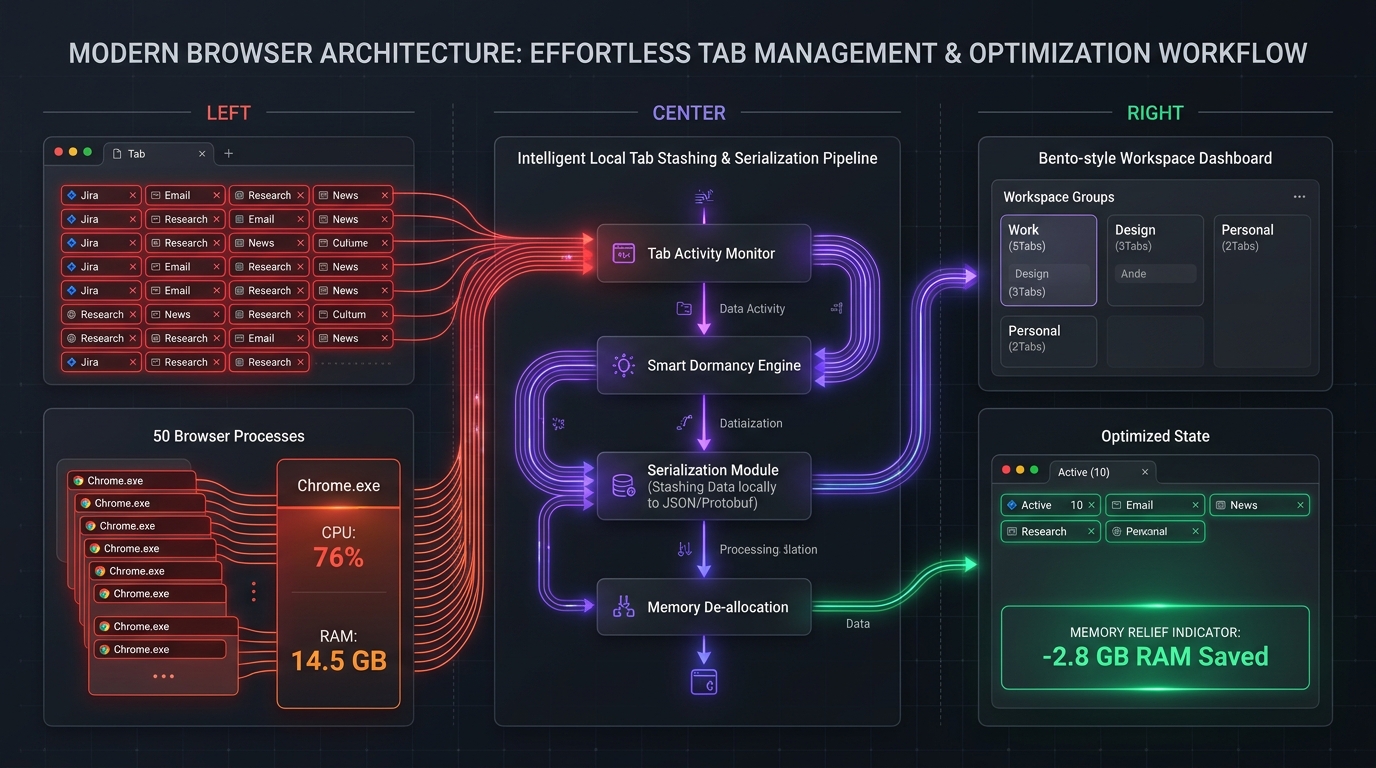
Here is the technical lifecycle when you trigger Fogo's Tab Stash (Alt + S):
-
1
Metadata Extraction: The extension queries the Chromium `chrome.tabs` API, extracting each tab's canonical URL, favicon URI, scroll position, and document title.
-
2
Local IndexedDB Serialization: The extracted session metadata is serialized into compact JSON structures stored directly inside the browser's local sandbox storage. No cloud server ever sees your links.
-
3
Complete Process Eviction: The Chromium renderer processes are explicitly terminated via `chrome.tabs.remove()`. The operating system immediately frees up CPU cycles, GPU memory buffers, and RAM.
-
4
Instant One-Click Restoration: Whenever you return to that workspace, you can reopen a single URL or restore all 20 tabs simultaneously in under 200ms.
4. Top 7 Chrome Tab Managers Benchmarked & Compared (2026 Edition)
We tested the most popular Chrome tab manager extensions in an isolated Chromium environment across identical 50-tab real-world sessions (including GitHub, TradingView, Notion, YouTube, and Google Docs). Here is the comparative breakdown:
| Extension | Key Mechanism | RAM Saved | Privacy Model | Speed | Price |
|---|---|---|---|---|---|
 Fogo Fogo
|
Tab Stash + Bento Dashboard | -2.8 GB | 100% Local / Zero Telemetry | ~14 ms | Free / $9.99 Pro |
| OneTab | Raw URL List Converter | -2.4 GB | Local storage | ~45 ms | Free |
| Toby | Card Collection Grid | -1.6 GB | Cloud Sync / Tracking | ~240 ms | Free / $54/yr Pro |
| Workona / TabX | Cloud Workspaces | -1.8 GB | Cloud Account Required | ~310 ms | Free / $84/yr Pro |
| Tabli | Hierarchical Tree Popup | -0.9 GB | Local-only | ~35 ms | Open Source Free |
| Session Buddy | History & State Backup | -1.1 GB | Local IndexedDB | ~80 ms | Free / Paid Tiers |
| Chrome Native Groups | Visual Color Bands | 0 GB (Unless discarded) | Built into Google account | Native | Free Built-in |
Detailed Breakdown of the Top Contenders
1 Fogo — The All-in-One Modular Workspace & Tab Stash
Editor's ChoiceUnlike one-dimensional extensions that only list URLs as plain text, Fogo transforms the blank new tab screen into a high-performance command center. You can partition your workflow into 4 distinct workspaces (Engineering, Financial Markets, Content Creation, and Daily Ops) with custom bento widgets for GitHub PR queues, live crypto charts, local scratchpad notes, and ambient soundscapes.
Whenever tabs accumulate, pressing Alt + S stashes all background tabs instantly, immediately dropping Chrome's RAM footprint by up to 2.8 GB. Because it adheres to a strict local-first architecture, no browsing data or URLs are ever transmitted across the internet.
2 OneTab — The Minimalist URL Converter
OneTab is the pioneer that popularized the concept of tab dumping. Clicking its toolbar icon takes every open tab and reduces it into a static HTML list of links.
Pros & Cons: It is lightweight and works well for quick emergency memory dumping. However, its 2012-era interface lacks workspace organization, provides no widget integrations, and many users report tragic link loss if the browser profile experiences corruption.
3 Toby — The Visual Card Organizer
Toby organizes tabs into visually appealing cards arranged in columns. It allows you to create collections and share lists across remote marketing or design teams.
Pros & Cons: While visually modern, Toby's extensive cloud synchronization scripts introduce noticeable new tab load latency (~240ms). In addition, its idle RAM footprint hovers around 110 MB, and full team features demand a steep $54/year subscription.
5. The 5-Step Daily Tab Organization Blueprint
Software alone cannot fix chronic tab hoarding without a disciplined daily workflow. Here is the exact 5-step operational blueprint utilized by high-output software engineers and remote knowledge workers:
Step 1: Partition by Context, Never by Project
Rather than creating a separate tab group for every single client email or bug ticket, create 3 to 4 broad context zones: Focus Work, Communication, and Reference Docs. In Fogo, map these to Workspace 1, 2, and 3 using Alt + 1-4.
Step 2: Enforce the "Rule of 9" Active Tabs
Chromium natively allows fast tab switching using Ctrl + 1 through Ctrl + 9. Once you exceed 9 open tabs, you lose rapid muscle-memory navigation. Stash non-essential tabs the moment you hit double digits.
Step 3: Stash and Hibernate Before Deep Work
Before jumping into a 60-minute coding sprint, financial modeling session, or writing block, hit Alt + S. Clear out all distracting tabs so only your immediate objective remains on screen.
Step 4: Use Scratchpads Instead of Holding Tabs Open
Most people hoard tabs because of an irrational fear of losing an idea or snippet. Use Fogo's built-in local scratchpad widget on your new tab to paste critical snippets, code blocks, or URLs, then immediately close the tab.
Step 5: The "Zero-Inbox" Browser Shutdown
At the end of your workday, never leave 40 zombie tabs waiting for tomorrow morning. Either stash them into a named workspace archive or close them entirely. Starting each day with a clean, calm new tab reduces cognitive morning drag by 80%.
6. Essential Keyboard Shortcuts for Chrome Tab Mastery
Touching your mouse to manage tabs is an unnecessary context switch. Memorize these universal keyboard shortcuts to navigate and control your browser at terminal speed:
| Action | Windows & Linux | macOS | Impact |
|---|---|---|---|
| Stash Inactive Tabs (Fogo) | Alt + S | Option + S | Frees ~2.8 GB RAM |
| Toggle Workspaces 1-4 | Alt + 1-4 | Option + 1-4 | Context Isolation |
| Search Open Tabs | Ctrl + Shift + A | Cmd + Shift + A | Zero Click Discovery |
| Reopen Closed Tab | Ctrl + Shift + T | Cmd + Shift + T | Instant Undo |
| Jump to Specific Tab (1-8) | Ctrl + 1-8 | Cmd + 1-8 | Lightning Navigation |
| Chrome Task Manager | Shift + Esc | Window → Task Manager | Inspect RAM Leaks |
7. Frequently Asked Questions (FAQ)
What is a Chrome tab manager and why do I need one?
A Chrome tab manager is a browser extension that organizes, searches, and suspends open tabs. If you regularly open more than 15 tabs, a tab manager prevents memory leaks, frees up operating system resources, eliminates visual confusion, and saves hours of lost productivity.
Why does Chrome consume so much RAM with multiple tabs open?
Chrome implements a security feature called Site Isolation. Every website domain and third-party iframe runs inside its own isolated process thread to prevent cross-site scripting vulnerabilities. While secure, this means 50 open tabs can easily consume 4 GB to 8 GB of RAM.
Does Chrome’s native Memory Saver make tab manager extensions obsolete?
No. Chrome’s native Memory Saver simply evicts DOM trees from background tabs, but leaves the tiny favicons cluttering your upper tab strip. Clicking an evicted tab causes an annoying 2-3 second freeze as the page re-downloads, and any unsaved form input can be permanently lost.
Are Chrome tab managers secure and private?
Not all tab managers protect your privacy. Many commercial extensions send your open tabs and browsing history to third-party cloud servers for analytics or monetization. Fogo is built with a local-first guarantee: all stashed tabs and workspace configurations remain encrypted in your local browser sandbox, with zero external tracking.
Can I use multiple new tab or tab manager extensions simultaneously?
Chrome only allows one extension to control the `chrome://newtab` start screen at a time. However, Fogo integrates both a modular new tab dashboard and an intelligent tab stashing engine into a single unified extension, eliminating the need to stack multiple conflicting tools.
Cure Tab Overload & Build Your Ideal Start Screen
Install Fogo completely free on the Google Chrome Web Store. Stash inactive tabs with a single keypress, reclaim up to 2.8 GB of system memory, and unlock 22 custom dark themes.